
Do These 9 Things to Get Your Emails Out of Spam
According to Statista, 45% of emails end up in spam. So, are your emails reaching your audience or stuck in the junk folder?
When emails don’t get delivered, fewer people open them, and you lose sales. But don’t worry—if your emails are going to spam, it’s not too late to fix it!
In this blog, we’ll share strategies used by experts like Neil Patel to improve inbox placement and avoid spam filters for good!
So, let’s get started! Shall we?
1. Use a Clear and Recognizable Sender Name
If your email sender’s name is unclear or looks suspicious, there’s a good chance the email provider will flag it as spam.
That’s why it’s super important to make your sender’s name clear and trustworthy. When people see your email, they should instantly know it’s from you!
For personal emails, just use your name. For business emails, go with your company name or a trusted person’s name. This helps build familiarity and strengthens your brand.
Also, avoid using weird characters or unfamiliar names—they can look suspicious and trigger spam filters.
So, make it easy for your clients to recognize you, and your emails won’t end up in the spam folder!
2. Authenticate Your Email Domain
Without email authentication, spam filters or email providers might think your emails are not real and send them to the spam folder.
Plus, if this keeps happening, it can hurt your reputation, making it even harder to reach your clients in the future.
So, authenticate your email domain – it proves your emails are legit and sent by you. Also, inbox providers trust verified emails more.
How do you do it?
Here are three tools to help you set up authentication, according to Google:
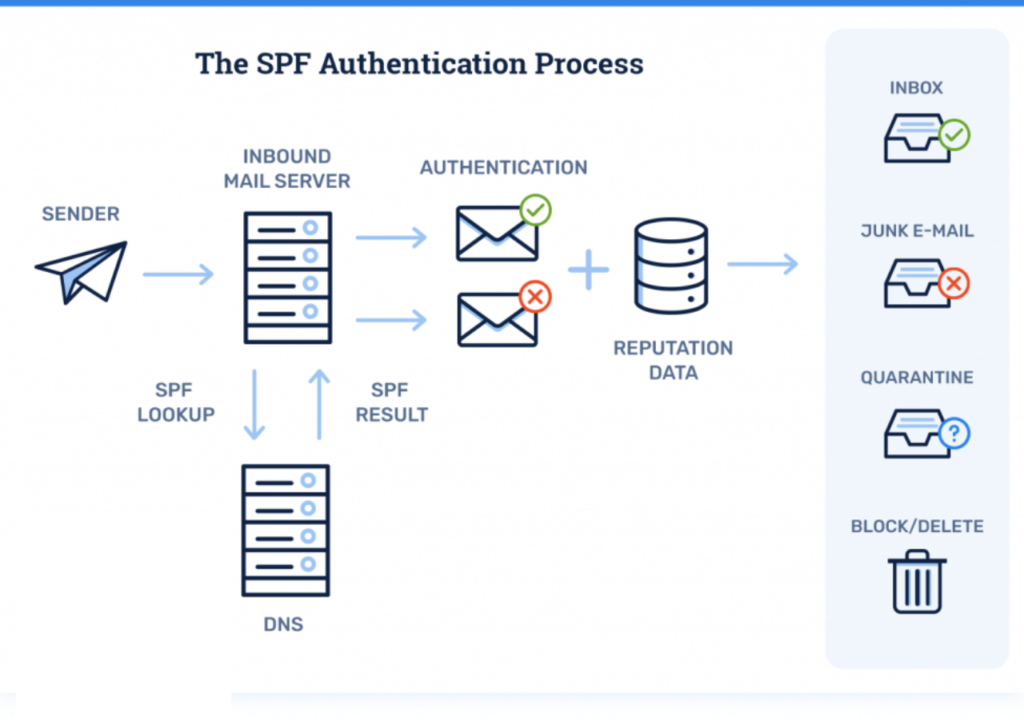
- SPF (Sender Policy Framework): It tells email providers who are allowed to send emails from your domain.
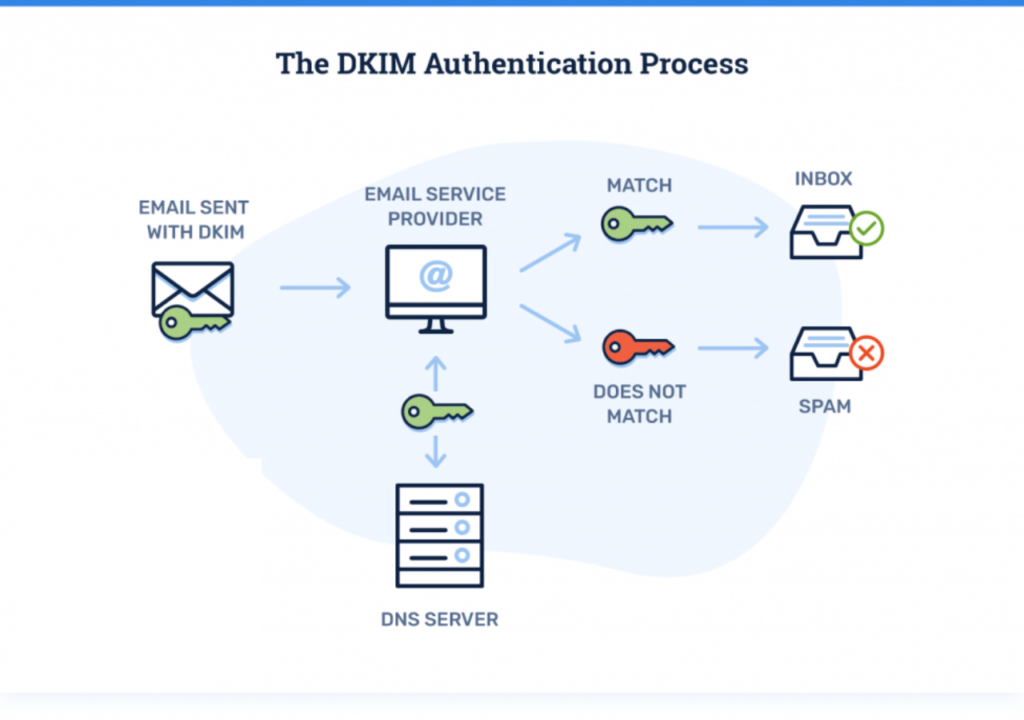
- DKIM (DomainKeys Identified Mail): This ensures your email content isn’t messed with while it’s being sent.
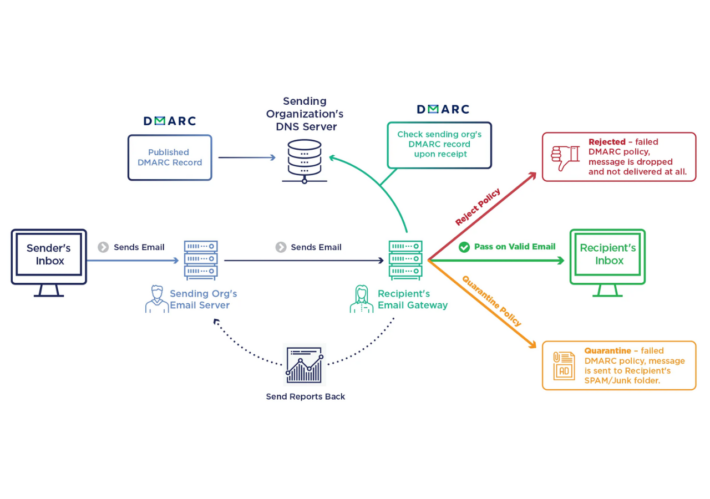
- DMARC (Domain-Based Message Authentication, Reporting & Conformance): This one works with SPF and DKIM to add extra security.
Once you set these up, email providers will know your emails are safe. So, your emails are less likely to get stuck in spam.
3. Use Double Opt-In and Get Permission to Send Emails
Sending emails to people who don’t want them can hurt your deliverability. How?
When people ignore or mark your emails as spam, email providers take note and start flagging your future emails too.
Also, did you know the average click-through rate in 2024 is only 1.4%, according to Forbes?
Now, imagine sending emails to people who don’t even want to open them—that’s a big waste of time and resources!
To avoid this, make sure you’re only emailing people who want to hear from you by using Double Opt-In. Here’s how it works:
- When someone signs up, send them a welcome email.
- Then, ask them to click a link or take action to confirm they want to receive your emails.
- Once they confirm, they’re added to your email list.
4. Avoid Spam Trigger Words
Spam filters are getting smarter these days. They don’t just look for words like “Free” or “Win” anymore; they also check how good your email is and how trustworthy you are.
That said, using too many “spammy” words can still cause trouble, especially if you’re new to email marketing.
So, to keep your email out of the spam folder, focus on sending helpful and fun content that your readers will like.
For example, instead of saying, “Limited time offer, act fast!” try saying, “Check out these exclusive deals just for you.”
Want to make sure your email stays out of the spam folder?
Use tools like Unspam Email or Mail Tester to check if your email passes the spam test.
Here’s what you can read next:How to make your emails impossible to ignore
5. Build Your Email List the Right Way
Clients are more likely to pick your emails over others if they are engaging. That’s because, when clients like your emails, they’ll want to open them again and again.
So, here are a few tips on how to make your emails more engaging along valuable to stand out:
- Add sign-up forms to your website.
- Promote your list on social media.
- Collect emails during webinars or events.
- Encourage referrals with rewards for subscribers.
Remember, growing your list naturally is the best way to stay out of the spam folder!
6. Clean Your Email List Regularly
If you notice fewer opens or clicks, it might be time to clean your email list. Sending emails to people who aren’t interested anymore can do more harm than good.
Why?
Because people can get annoyed—and they might even mark your emails as spam. And that’s a fast track to losing your reputation.
So, here are a few tips to keep your email list clean and healthy:
- Remove inactive users and bounced emails—don’t let them drag you down.
- Watch out for spam traps—old, unused emails that can hurt your reputation.
- Monitor engagement–Keep an eye on your opens and clicks to spot inactive subscribers.
Remember, a healthy list means better deliverability and fewer headaches. Clean it up, and your emails will land where they belong—in the inbox!
7. Write Emails to Encourage Engagement
Wondering why your emails are still ending up in the spam folder despite following all the right steps?
One big reason: is the lack of engagement. Email providers will trust you more when your subscribers engage with your emails.
The more interaction you get (opens, clicks, replies), the less likely spam filters are to flag your emails.
So, here are a few ways how you can encourage engagement through your email:
- Add links and buttons to make it easy for readers to interact.
- Add quizzes or polls to make emails more fun and interactive.
- Ask Questions to make the email feel more like a conversation.
As a result, your emails will stay in the inbox, where they belong!
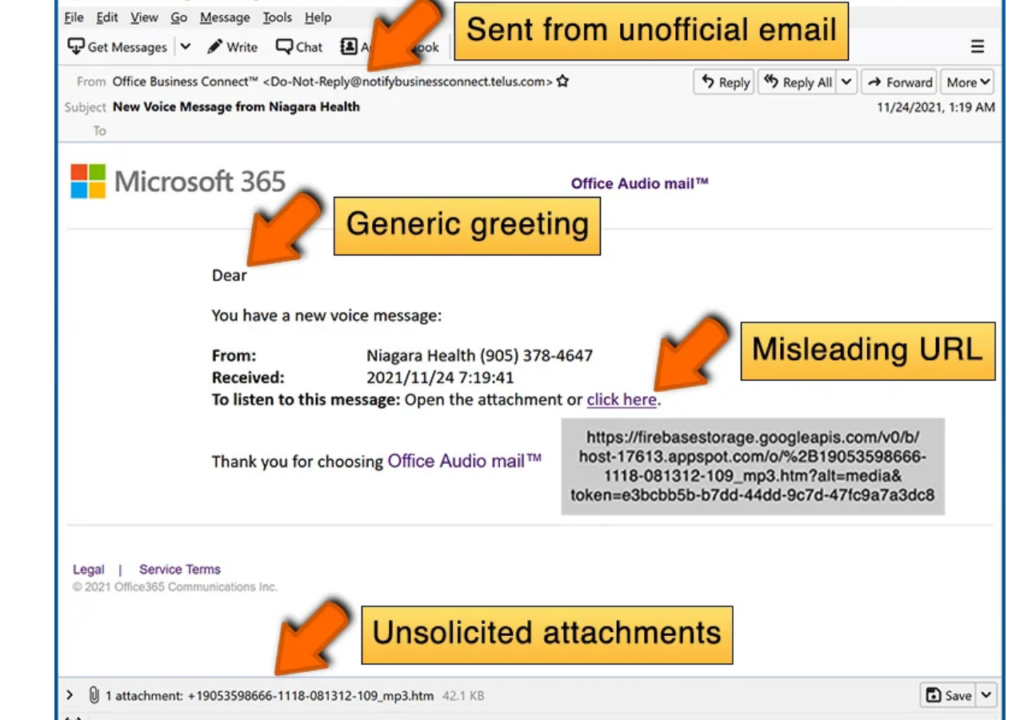
8. Limit the Use of Attachments and Images
Large emails with lots of pictures or big attachments can fill up someone’s storage. So, people might just mark your emails as spam to stop getting them.
Even email providers think big, bulky emails are suspicious. Why?
Because no one expects large attachments and oversized files in their inbox every day.
So, here are a few ways how you can keep your emails small and simple:
- Keep it under 500 KB: Smaller emails are easier to deliver.
- Use small images: Formats like PNG work better than big JPEGs.
- Watch attachments: Make sure everything stays under 10 MB.
When your emails are lightweight, they’ll land in the inbox faster, avoid spam, and keep your audience happy!
9. Follow Email Marketing Rules
Laws like CAN-SPAM, CASL, GDPR, and CCPA protect people from spam, and ignoring them can cause serious trouble.
What really annoys your audience?
Getting emails they didn’t sign up for, misleading subject lines, or not having an easy way to unsubscribe. That’s a quick way for people to mark your emails as spam and ruin your reputation.
So, here’s how you can stay on the right side of the law and keep things respectful:
- Ask Permission First: You need to get permission before emailing someone. This is required by laws like GDPR. So, the law stops unwanted emails and keeps people’s privacy safe.
- Be Honest in Subject Lines: Don’t trick people with your subject lines. The subject should match the email content. Plus, laws like CAN-SPAM make sure this is followed.
- Let Them Unsubscribe: Always include an easy way to unsubscribe. If someone doesn’t want your emails, let them opt out. Also, this is a law under the CAN-SPAM Act.
When you follow these simple steps, your emails will avoid trouble and go straight to your audience’s inboxes.
Conclusion
Let’s wrap things up, shall we?
By now, you can see that keeping your emails out of the spam folder can be tricky, but it’s definitely doable!
Here’s how you can boost your email deliverability and say goodbye to the spam folder:
- Use Clear Sender Names: Make sure your name or your company name is easy to recognize, so people trust your email.
- Authenticate Your Email Domain: Verify your email to show that it’s legitimate and safe to open.
- Use Double Opt-In and Get Permission to Send Emails: Always ask people for permission before sending emails.
- Avoid Spammy Words: Don’t use words like “free” or “win” too often—use clear and helpful language instead.
- Build Your Email List: Grow your email list organically to build trust and improve deliverability.
- Clean Your List: Regularly remove inactive email addresses to keep your list fresh and engaged.
- Encourage Engagement: Create content that your readers want to engage with and respond to.
- Keep the Email Size Small: Make sure your emails load quickly by keeping them simple and to the point.
- Follow Rules Stated in the Law: Follow laws like GDPR and CAN-SPAM to ensure compliance and build trust.
Here’s what you can read next:Want More Sales? Try These 5 Smart Email Segmentation Tactics to Sell More!
Try Us Out, Totally Risk-Free!
Got a launch coming up? We’ll run the entire launch for you, and you pay only after you see results.